BIOS Setup
The LattePanda Iota features a configurable TDP (Thermal Design Power) ranging from 6W to 15W. This allows users to optimize the balance between power consumption and computational performance based on specific requirements.
-
6W mode: Utilized with an passive heatsink to enables fanless, silent operation, suitable for noise-sensitive embedded systems or quiet environments.
-
15W mode: Utilized with an active cooler to full performance, easily handling high-load computing tasks.
To adjust the TDP, you can modify the PL1 (Power Limit 1) and PL2 (Power Limit 2) values in the BIOS.
Understanding PL1 and PL2
- PL1 (Power Limit 1): The long-term power limit. This defines the sustained power consumption the processor maintains under continuous load.
- PL2 (Power Limit 2): The short-term burst power limit. It allows the processor to exceed PL1 for a brief period to handle instantaneous spikes in workload before scaling back to the PL1 level to manage thermals.
Configuration Steps
-
After entering the BIOS setup, navigate to the following path:
Advanced -> CPU Configuration -> Power Limit 1 / 2 -
Set the Power Limit 1 and Power Limit 2. The unit for both values is milliwatts.
- 10W Mode(Default) :
Power Limit 1 = 10000; Power Limit 2 = 20000 - 6W Mode:
Power Limit 1 = 6000; Power Limit 2 = 6000 - 15W Mode:
Power Limit 1 = 15000; Power Limit 2 = 20000
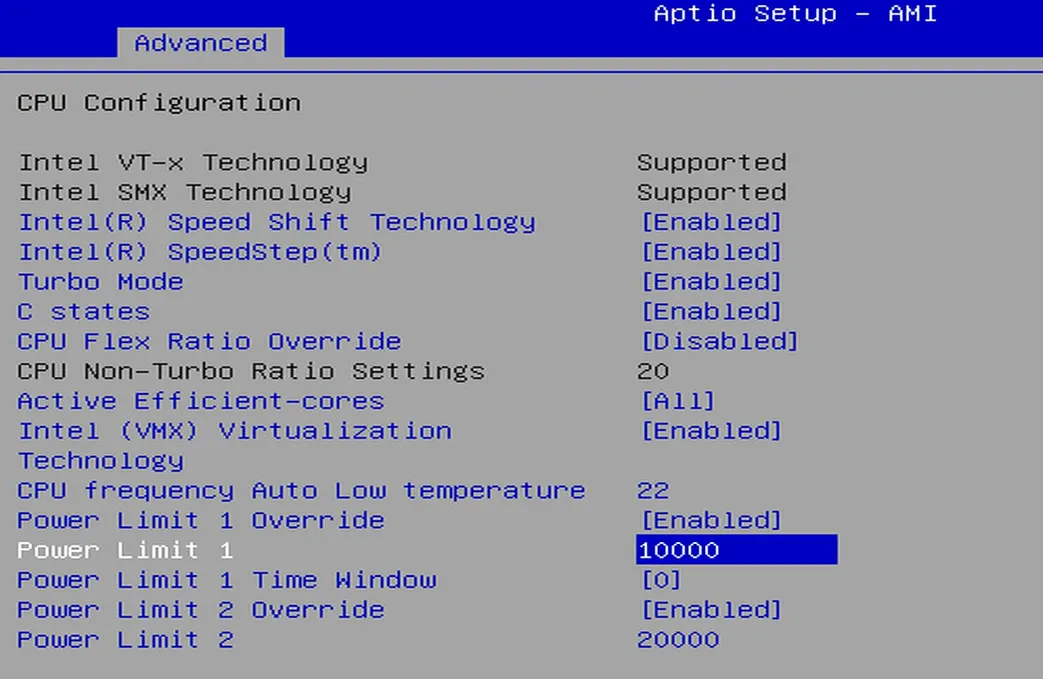
- 10W Mode(Default) :
TDP-down Limit
According to the TDP parameters provided by Intel, the PL1 and PL2 value must not be lower than 6W. Otherwise, it will cause the processor to operate at its minimum frequency, severely impacting performance.
- After these settings, select
Save Changes and Reseton the`Save & Exitpage to save the BIOS settings.