FAQ
After I installed the LattePanda Mu Ultra onto the carrier board, why doesn't it boot into the operating system and instead goes directly to the BIOS setup page?
 The LattePanda Mu Ultra does not have onboard storage; you need to connect external storage such as an NVMe SSD and install the operating system. Please refer to the Initial Setup for detailed steps.
What type of connector does the LattePanda Mu Ultra use?
The LattePanda Mu Ultra utilizes a standard 260-pin SO-DIMM form factor connector. The officially recommended connector part number for carrier board design is TE Connectivity 2309411-1.
Is the LattePanda Mu Ultra compatible with standard 260-pin SO-DIMM DDR4 carrier boards?
While the LattePanda Mu Ultra physically fits into a standard 260-pin SO-DIMM DDR4 slot, its pinout is uniquely defined by LattePanda. It is NOT compatible with standard DDR4 memory pin configurations or other compute modules that use the same physical slot.
Forcing the module into a standard DDR4 slot and powering it on will cause permanent damage to the board! Always ensure you are using a carrier board specifically designed for the LattePanda Mu Ultra series. You can refer to the LattePanda Mu Ultra Pinout Table for the exact pin definitions.
Are the LattePanda Mu and LattePanda Mu Ultra identical in size?
They share the same length and width (69.6 mm × 60 mm) and use the same 260-pin SO-DIMM edge connector, so a module can be swapped between carrier boards — provided the carrier board circuitry is designed to support both modules. The processor height and the onboard fan mounting holes differ slightly; please refer to the Migration Guide: Cooling Solution Changed
LattePanda Mu and LattePanda Mu Ultra use the same DDR4 260P SODIMM edge connector, what are the specific differences? What do I need to pay attention to when upgrading my carrier board design from LattePanda Mu to LattePanda Mu Ultra?
We have provided a detailed migration guide, please refer to the migration guide from LattePanda Mu to LattePanda Mu Ultra.
Can the two USB 3.2 ports (USB3_P1 and USB3_P2) on the LattePanda Mu Ultra be multiplexed into other functions, such as PCIe — like the HSIO pins on the LattePanda Mu?
No. These two ports support USB 3.2 only and cannot be reconfigured for other functions.
Can the PCIe lanes on the LattePanda Mu Ultra be multiplexed into other functions, such as USB 3.2 or SATA?
No. All PCIe lanes operate as PCIe only and cannot be reconfigured for other protocols.
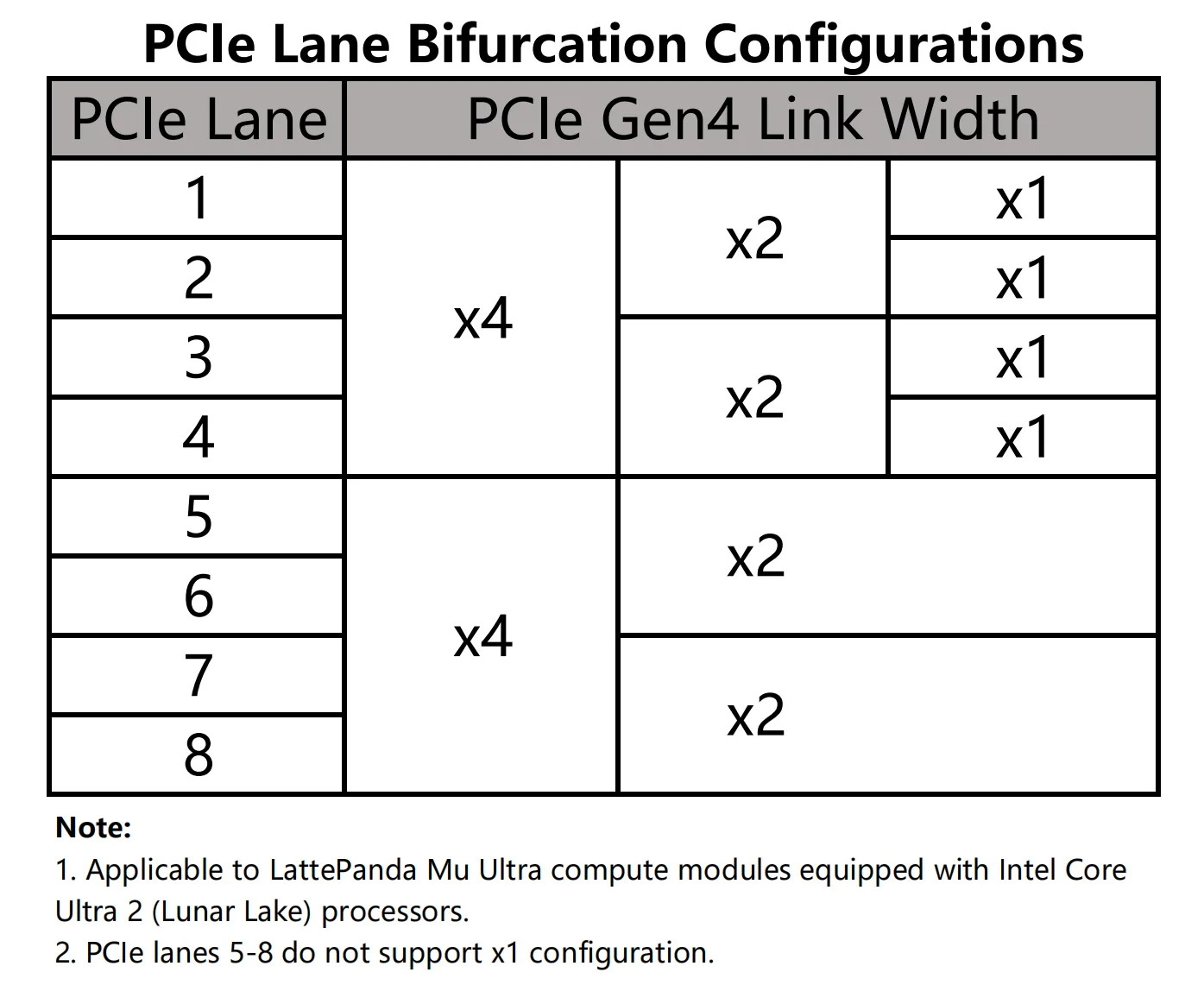
What PCIe bifurcation does the LattePanda Mu Ultra support?
See the diagram below. Note in particular that PCIe lanes #5 to #8 can only be bifurcated down to x2 — x1 is not supported.
The LattePanda Mu Ultra's processor supports PCIe 5.0. Why are the exposed pins limited to PCIe 4.0?
PCIe 5.0 operates at extremely high signaling rates, imposing strict requirements on trace length and impedance control. After passing through the module's edge fingers and the 260-pin SO-DIMM connector onto the carrier board, PCIe 5.0 signals can no longer be guaranteed to work reliably. To ensure stable PCIe operation, the BIOS limits these links to PCIe 4.0.
Which carrier boards are compatible with LattePanda Mu Ultra compute module?
We maintain a full compatibility list covering every compute module and carrier board — see the Compatibility List.
Why does the LattePanda Mu Ultra sometimes fail to enter sleep mode — the screen turns off but the fan keeps spinning?
The processor of the LattePanda Mu Ultra does not support the traditional S3 sleep state; it only supports Modern Standby. This behavior has existed on Windows systems since the S0ix era and is not specific to this product. Our testing shows the issue occurs more frequently when the system is connected to a network, and much less frequently on Linux.
In addition, entering Modern Standby requires PCIe peripherals to use the CLKREQ pin to trigger their low-power state. Some PCIe connectors on carrier boards — such as the OCuLink connector, standard PCIe slot — do not provide a CLKREQ pin, so a device connected to these connectors will also prevent the system from entering Modern Standby.
Why does the LattePanda Mu Ultra sometimes wake up briefly during Modern Standby — the fan spins up without the screen turning on — and then go back to sleep?
During Modern Standby, background maintenance tasks and connected-standby updates can wake the system without turning on the display. Once the tasks are complete, the system automatically re-enters Modern Standby. This is why you may occasionally notice the fan suddenly spinning with no display output, then stopping again after a while.
How do I deploy an LLM/VLM or YOLO model locally? Are there any tutorials?
We recommend the OpenVINO framework — it supports LLM/VLM and vision models on this compute module, with iGPU ("GPU") and NPU ("NPU") acceleration. Pick your scenario:
1. LLM / VLM chatbot (iGPU accelerated)
-
Install OpenVINO GenAI —
pip install openvino-genai -
GenAI Quick Start Guide — minimal
LLMPipeline/VLMPipelinechat code, set device to"GPU" -
LLM Chatbot notebook — ready-to-run Gradio chat UI (Qwen3, Phi-4, etc.)
-
VLM Chatbot notebook — image + text chat (Qwen3-VL,etc.)
2. Local OpenAI-compatible API server (iGPU accelerated)
-
OVMS GenAI Endpoints — OpenAI-compatible
chat/completions/responsesAPI -
Step-by-step demo — one command to serve a model; set
--target_device GPU, then point any OpenAI client tohttp://<device-ip>:8000/v1
3. YOLO26 object detection (NPU / iGPU accelerated)
-
Ultralytics × OpenVINO integration — one-line export (
format=openvino), run withdevice="intel:npu"ordevice="intel:gpu" -
YOLO26 notebooks — detection, segmentation, keypoints, OBB + INT8 quantization demos
-
NPU device guide — driver setup and limitations (static shapes only)
4. Alternatives: llama.cpp / Ollama with OpenVINO backend
-
llama.cpp OpenVINO backend (official) — built into llama.cpp mainline; build with
-DGGML_OPENVINO=ON, then setGGML_OPENVINO_DEVICE=GPU(iGPU) orNPU; includes ready-made Ubuntu/Windows build scripts and allama-servermode with OpenAI-compatible/v1/chat/completions -
ollama_ov (community fork) — Ollama with an OpenVINO GenAI backend: import OpenVINO IR models via
ModelType "OpenVINO"+InferDevice "GPU"in the Modelfile; keeps the familiarollama runworkflow
Need More Help?
If you encounter any issues while using the LattePanda Mu Ultra, please feel free to reach out to our community:
- Open a discussion or issue on the LattePanda Forum.
- Join our Discord server for real-time support and to connect with other makers.
Contribute to the Documentation
We highly appreciate your contributions to improving our documentation! If you find any errors, have suggestions for enhancement, or want to submit tutorial updates, please feel free to contribute to our Docs Repository.
Thank you for your great support, and happy tinkering!