Auto Power-On
The Auto Power-On feature allows the LattePanda Sigma 2 to start up automatically when power is supplied, without pressing the physical power button — essential for embedded and unattended deployments.
LattePanda Sigma 2 offers two ways to achieve this:
- DIP Switch — hardware-level, no BIOS setting required.
- Onboard MCU (RP2350) — programmable, offering enhanced flexibility, e.g. powering on under custom conditions.
Configure via DIP Switch
-
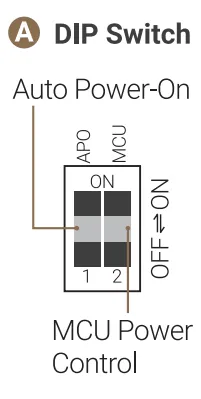
Locate the onboard DIP switch.
-
Set the APO actuator:
Actuator Position Behavior OFF (Default) Requires pressing the power button to turn on after power is applied. ON Automatically powers on when power is applied.
Note
- Only this actuator of the DIP switch needs to be set; no modifications are required in the BIOS settings!
- This setting takes effect immediately, and is unaffected by the RTC battery.
Configure via Onboard MCU
The RP2350 co-processor's GPIO18, GPIO19 and GPIO20 are internally connected to the board's S0 state pin, S3 state pin and SW (power button) pin respectively. The RP2350 can therefore read the system's power state and "press" the power button by itself — enabling auto power-on under custom conditions.
| RP2350 Pin | Board Connection |
|---|---|
| GPIO18 | Internally Connected to S0 State Pin |
| GPIO19 | Internally Connected to S3 State Pin |
| GPIO20 | Internally Connected to SW Button |
| GPIO21 | Internally Connected to RST Button |
| GPIO22 | Internally Connected to S4 State Pin |
The state pins in different system states behave as follows:
| Powered but not turned on | Run | Sleep/Suspend (Modern Standby) | Hibernate | Shut Down | |
|---|---|---|---|---|---|
| S0 Pin | Low | High | Low | Low | Low |
| S3 Pin | Low | Low | High | Low | Low |
| S4 Pin | Low | Low | Low | High | Low |
For details, please refer to the RP2350 GPIO Mapping and GPIO Header sections.
The following will demonstrate how to use the MCU to achieve auto power-on when external power is supplied.
-
Keep the RP2350 Powered
Set the MCU actuator of the DIP switch to ON, so that the RP2350 is supplied with power whenever the board receives power input — even before the system is turned on. Please refer to the DIP Switch section.
Note
The DIP switch controls the MCU's power supply only before the system is turned on; in other states it is configured by the MCU Power Control setting in the BIOS (default
Auto: powered while running and sleeping) — please refer to the MCU Power Control section. -
Upload the Auto Power-On Code
The RP2350 ships with MicroPython firmware pre-loaded. Using Thonny, save the following code as
main.pyon the RP2350 — please refer to the MicroPython section for detailed steps:from machine import Pin import time S0 = Pin(18, Pin.IN) S3 = Pin(19, Pin.IN) SW = Pin(20, Pin.IN) # High-impedance input = button released time.sleep(1) # Wait for the power supply to stabilize # The check below runs only once, when the RP2350 starts up. # If the system is off (power was just reconnected), press the power button. while S0.value() == 0 and S3.value() == 0: # System is off SW.init(Pin.OUT) SW.value(0) # Press the power button time.sleep_ms(500) SW.init(Pin.IN) # Release the button time.sleep(1) # Wait and re-check the state # main.py ends here and the RP2350 stays idle, so a later manual # shutdown stays off until the next power cycle.If you prefer Arduino C++, upload the following sketch instead — please refer to the Arduino C++ section:
/*
 * LattePanda Sigma 2 Auto Power-On via onboard RP2350
 */
#define PIN_S0 18  // System status pin
#define PIN_S3 19  // System status pin
#define PIN_SW 20  // Power button pin

void setup() {
  pinMode(PIN_S0, INPUT);
  pinMode(PIN_S3, INPUT);
  pinMode(PIN_SW, INPUT);  // High-impedance = button released
  delay(1000);             // Wait for the power supply to stabilize

  // The check below runs only once, when the RP2350 starts up.
  // If the system is off (power was just reconnected), press the power button.
  while (digitalRead(PIN_S0) == LOW && digitalRead(PIN_S3) == LOW) {  // System is off
    pinMode(PIN_SW, OUTPUT);
    digitalWrite(PIN_SW, LOW);   // Press the power button
    delay(500);
    pinMode(PIN_SW, INPUT);      // Release the button
    delay(1000);                 // Wait and re-check the state
  }
}

void loop() {
  // Intentionally empty: a later manual shutdown stays off
  // until the next power cycle.
}
Both programs work the same way: the check runs only once, when the RP2350 starts up. If the system is off at that moment (both S0 and S3 are LOW, i.e. the power supply was just reconnected), the RP2350 pulls the SW pin LOW for 500 ms — equivalent to pressing the power button — then releases it. Afterwards the programs stay idle.
-
Verify Auto Power-On Function
Shut down the LattePanda, disconnect the power supply, then reconnect it. The LattePanda should power on automatically within a few seconds.
Note
This method is unaffected by the RTC battery.