RP2350 GPIO Programming
LattePanda Sigma 2 integrates an RP2350 co-processor. It communicates with the Intel processor via USB 2.0, and connects your local AI agents and applications to physical hardware via the 34-pin GPIO header — enabling event-driven control directly on the board.
- Dual ARM Cortex-M33 @ 150MHz
- 520KB on-chip SRAM
- 8MB onboard Flash
- 3.3V I/O Level
- Pre-loaded with MicroPython firmware
3.3V I/O Level Limit
The RP2350 operates at a 3.3V logic level. Its I/O pins are not 5V tolerant. Do not connect 5V devices directly to the GPIOs.
About RP2350
The RP2350 is Raspberry Pi's second-generation microcontroller. For chip details, refer to the official RP2350 documentation.
RP2350 GPIO Mapping
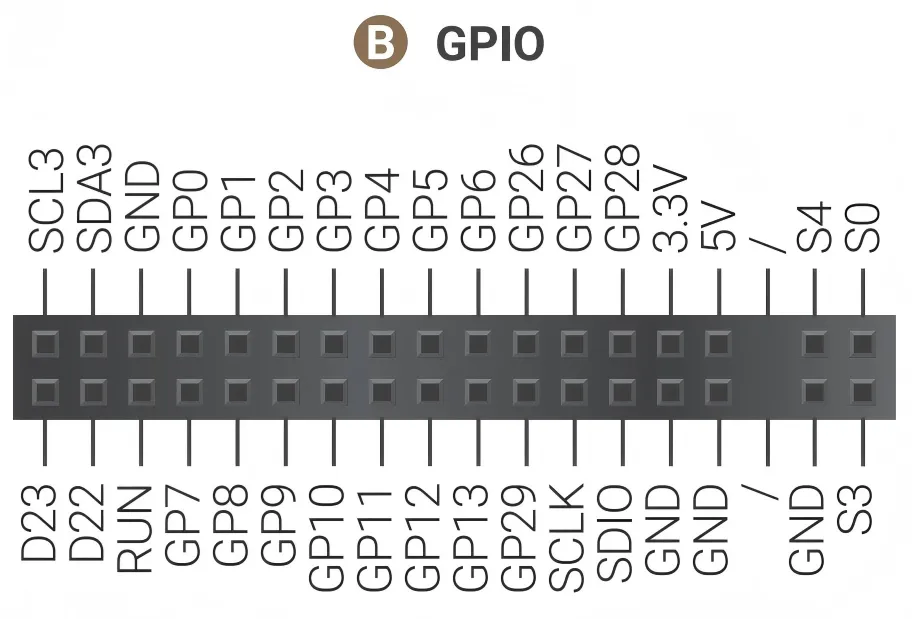
Most of the RP2350's GPIOs are routed out through the 34-pin GPIO header, and the remaining are internally connected or floating:
| RP2350 Pin | Board Connection / Function | Notes |
|---|---|---|
| GPIO0 ~ 13 | Header Pin GP0 ~ GP13 | Routed to the GPIO Header |
| GPIO14 ~ 17 | Not Connected | Internally Floating |
| GPIO18 | S0 | Internally Connected to S0 State Pin |
| GPIO19 | S3 | Internally Connected to S3 State Pin |
| GPIO20 | SW | Internally Connected to SW Button |
| GPIO21 | RST | Internally Connected to RST Button |
| GPIO22 | S4 | Internally Connected to S4 State Pin |
| GPIO23 ~ 24 | Not Connected | Internally Floating |
| GPIO25 | Onboard Red LED | Internally Connected to Red LED |
| GPIO26 ~ 29 | Header Pin GP26 ~ GP29 | Multiplexing Function: ADC each pin in parallel with a 100nF capacitor |
| SWCLK | Header Pin SCLK | SWD Clock |
| SWDIO | Header Pin SDIO | SWD Data I/O |
| RUN | Header Pin RUN | Hardware Reset, Active Low |
| IOVDD/DVDD | Header Pin 3.3V | Power Supply |
Note
GPIO26 to GPIO29 of the RP2350 can be muxed as ADC input. To ensure stable ADC sampling values, these pins are paralleled with 100nF capacitors, which can affect rapidly changing signals such as I2C. If using I2C, please avoid these four GPIO pins and choose alternative GPIO pins instead.
Uploading New Firmware to the RP2350
The RP2350 features a built-in USB bootloader stored in its ROM, which allows you to upload new firmware simply by copying a file — the board appears as a USB Mass Storage Device.
Onboard Buttons
- MCU_RST: The reset button. A short press performs a hard reset on the RP2350, restarting its current program.
- MCU_BOOT: The boot select button, used to put the RP2350 into bootloader mode, preparing it to receive new firmware.
Upload Instructions
Follow these steps to upload a .uf2 file to the RP2350:
- Press and hold the
MCU_BOOTbutton. - While still holding
MCU_BOOT, press and release theMCU_RSTbutton. - Release the
MCU_BOOTbutton. -
The OS will now detect the RP2350 as a new USB Mass Storage Device (like a flash drive), typically named
RP2350.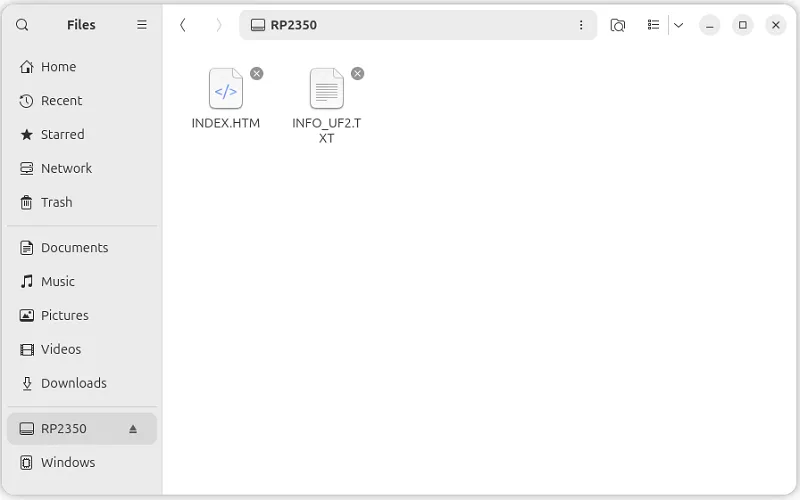
-
Drag and drop your firmware file (.uf2) onto this new drive.
- Once the file is copied, the bootloader will automatically verify the firmware, write it to the RP2350's flash memory, and then reboot. Your new program will start running immediately.
RP2350 Power Control
LattePanda Sigma 2 allows control of the RP2350's power supply through the onboard DIP switch and BIOS settings:
- The DIP switch (MCU Power Control) controls whether the RP2350 is supplied with power after the board receives power input but before the system is turned on. Please refer to the DIP Switch section.
- The RP2350's power behavior in other system states (running, sleep/suspend, hibernate, shutdown) must be configured in the BIOS. Please refer to the MCU Power Control section.
Programming Languages
- MicroPython — the pre-loaded firmware; the fastest way to start, and the recommended path for letting local AI agents control the GPIO.
- Arduino C++ — for projects based on the Arduino framework and its library ecosystem.