BIOS Setup
USB-A Port Power Control
Three USB Type-A ports on LattePanda Iota support power control.
Path: Advanced → Power Configuration → Always On Double/Single Deck USB Port
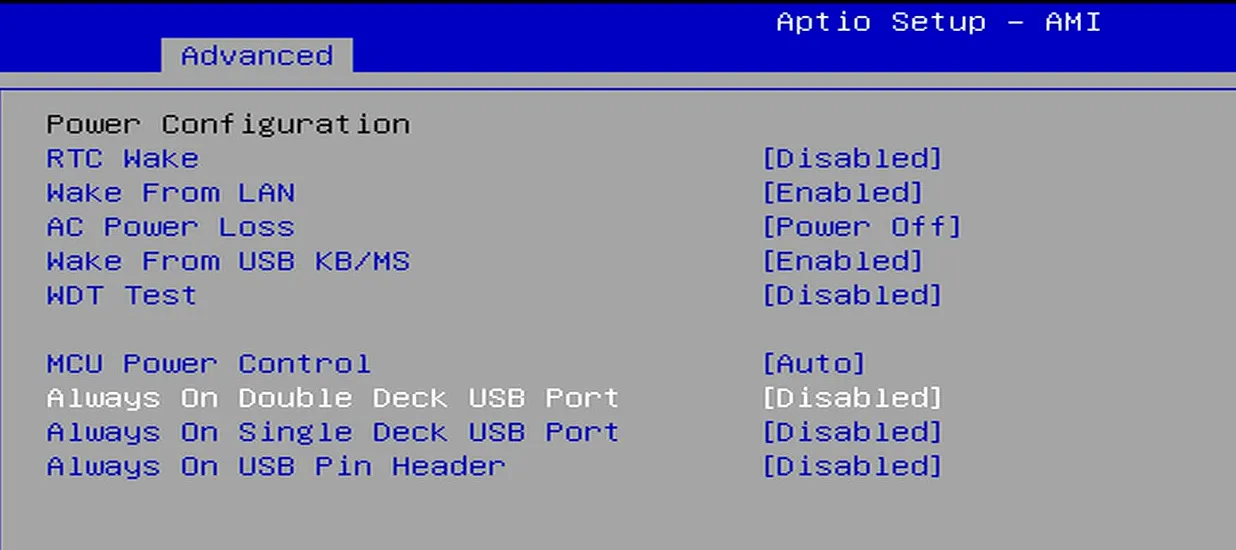
The default setting is disabled.
| Always On USB Port | Power Supply of the USB Port |
|---|---|
| Enabled | Running Mode: Sleep Mode: Hibernate Mode: Shut Down Mode: |
| Disabled | Running Mode: Sleep Mode: Hibernate Mode:  Shut Down Mode: |
| means Enabled, the USB port can output 5V power supply; means Disabled , the USB port can't output 5V power supply. |
Note
- The USB-A double-deck connector contains two USB ports, and the power supply to both ports can only be controlled together, not individually.
- If the LattePanda Iota is disconnected from the power supply, all USB-A ports are powered off by default when the LattePanda Iota is reconnected power supply and not turned on.
USB 2.0 Pin Header Power Control
The 5V pin of the USB 2.0 pin header (marked with a red arrow in the picture below) on the LattePanda Iota also supports power control.
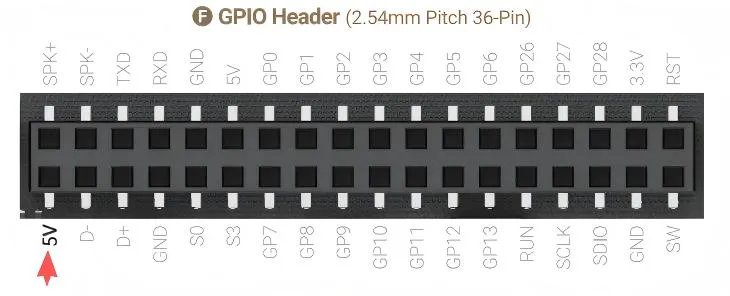
Path: Advanced → Power Configuration → Always On USB Pin Header
The default setting is disabled.
| Always On USB Pin Header | Power Supply of the 5V Pin |
|---|---|
| Enabled | Running Mode: Sleep Mode: Hibernate Mode: Shut Down Mode: |
| Disabled | Running Mode: Sleep Mode: Hibernate Mode: Shut Down Mode: |
| means Enabled, the 5V pin can output power; means Disabled , the 5V pin can't output power. |
Note
- If the LattePanda Iota is disconnected from the power supply, this 5V pin is powered off by default when the LattePanda Iota is reconnected power supply and not turned on.