External Interface
Power Button
This button functions almost the same as the power button on your laptop, as shown below:
When the board is in a shutdown or hibernation state, a short press of the power button will turn it on.
When the board is in sleep mode, a short press of the power button will wake it up.
When the board is running normally, a short press of the power button will trigger a preset action, which is typically Sleep by default.
You can customize this behavior in your operating system's power settings. For example, in Windows, you can navigate to Control Panel > Hardware and Sound > Power Options > Choose what the power buttons do to change the action to "Shut down," "Do nothing," etc.
If the OS becomes unresponsive or freezes, press and hold the power button for about 6 seconds until all indicator lights turn off. This will force the power off. Please note that this is an emergency procedure, and any unsaved work will be lost.
Reset Button
-
System Reboot
When the OS is running, a short press of the reset button will immediately restart the OS.
Warning
This action is similar to a "hard reset" and will not save any open files or work. Use it only when the system is unresponsive and cannot be restarted through the operating system.
USB 3.2 Type-A Port
The LattePanda Iota features a total of three USB Type-A ports.
-
Each port offers an impressive throughput of up to 10Gb/s — ideal for high-speed data transfer, external SSDs, and bandwidth-intensive peripherals.
-
All ports are native to the processor's PCH and do not pass through any USB hub chips.
-
The default BIOS setting is that the USB Type-A ports lose power after shutdown. If you want them to continue supplying power after the system is shut down, please refer to the BIOS USB Power Control section.
Maximum Current
- Dual-layer USB Connector: Features 2 USB ports, sharing a maximum current of 2.2A.
- Single-layer USB Connector: Features only 1 USB port, with a maximum current of 1.2A.
HDMI Port
- HDMI 2.1: Up to 4096x2160 @ 60Hz HDR
Note
The LattePanda Iota supports HDMI 2.1, enabling 4K@60Hz HDR output. For optimal performance, use a certified HDMI 2.1 or higher cable.
RJ45 Ethernet Port(1Gbps)
The LattePanda Iota includes one Gigabit Ethernet port, powered by the RTL8111H 1.0 GbE Ethernet Controller.
- Supports standard 10/100/1000 Mbps speeds.
- Compatible with Wake-On-LAN (WOL) for remote device management — perfect for headless setups or networked applications.
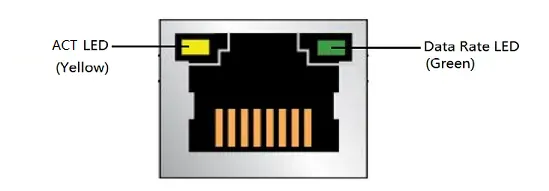
| LED | LED Color | LED State | Meaning |
|---|---|---|---|
| ACT LED | Yellow | Blinking | LAN activity is occurring |
| Data Rate LED | Green | OFF | 10 Mb/s data rate is selected, or no LAN Link |
| Green | 100/1000 Mb/s data rate is selected |
Headphone Jack
- 3.5mm
- CTIA Standard
- Supports stereo and microphone, can work simultaneously
-
Audio Out Priority:
- When headphones are not plugged in, audio is output by default from the SPK+ and SPK– pins in the GPIO Header.
- When headphones are plugged in, audio is output by default from the headphones.
TF(MciroSD) Card Slot
- The card reader chip connects to the processor’s PCH via USB 2.0.
- It supports booting from a TF card and installing the OS.
USB Type-C Port
The LattePanda Iota is equipped with a USB Type-C port dedicated solely to power delivery. It supports USB PD 15V input for stable and efficient system power.
Power Iput Only
This port does not support data transfer or video output — it is power-only.
Required Specifications of Power Adapter
- Supports USB Power Delivery (PD)
- Must negotiate 15V output from the power source
- Minimum power: 15V @ 1.8A
Most standard USB Type-C PD power adapters or power bank on the market can meet the aforementioned requirements.
Power Supply Priority
- see Power Option section.